

Prompt Manage
Prompt Manage lets your team create reusable prompt templates in the Alephant SaaS dashboard, assign each template a stable ID, and call it at runtime through the Alephant AI Gateway.
Instead of hardcoding prompts in application code, create the prompt once in Alephant, promote the tested version to production, and send the prompt ID with each request.
Alephant applies the production prompt template, forwards the request to the selected model, and records token usage, cost, latency, route, agent, user, and session metadata.
Core Flow
-
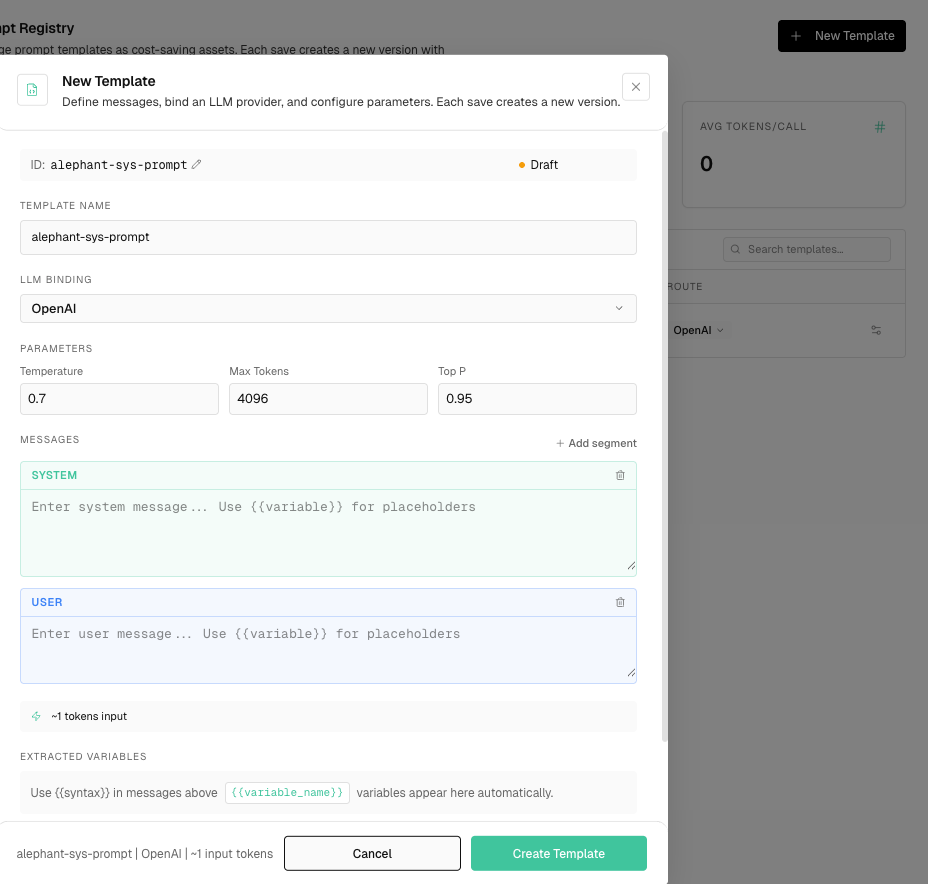
Create a prompt template in the Alephant dashboard.
-
Set a stable prompt ID, such as support-triage.
-
Add system, user, or assistant message segments.
-
Configure model binding and parameters.
-
Promote the tested version to production.
-
Call the gateway with Alephant-Prompt-ID.
Create A Template
In Prompt Manage, create a new template and configure:
Use stable IDs that your application can depend on:
support-triage
security-code-audit
workflow-service-planner
openclaw-browser-agent
Call A Prompt At Runtime
Send a normal model request through Alephant and include the prompt ID header.
Alephant prepends the production template messages before the runtime messages you send.
Use Variables
Prompt templates can contain variables:
You are helping {customer_name} on the {plan_name} plan Limit the response to {max_items} action items
Pass variable values in inputs:
If required variables are missing, Alephant rejects the request before provider dispatch.
Versioning
Each save creates a new prompt version.
Promote a version to production when you want future runtime calls for the same prompt ID to use it.
Prompt Cost Ledger
Prompt Manage is also a cost ledger for prompt assets. Each prompt-managed request can be attributed to:
- prompt ID
- prompt version
- bound model and provider
- agent or Virtual Key
- session or run context
- input tokens, output tokens, cost, latency, and status
This lets teams compare prompt versions by cost and operational impact, not only by text diff.
Model Binding And Routing
Templates can be bound to a default model and parameters. When policy allows it, teams can route a template to a cheaper model without changing application code.
Use this pattern when:
- a prompt is stable and reused often
- the same prompt supports multiple agents or workflows
- a prompt version needs cost comparison before promotion
- a team wants to move simple work to a lower-cost model
Model binding still follows workspace, agent, department, and Virtual Key policy. A prompt route should not override a model allowlist, budget hard stop, or security policy.
Caching Opportunities
Prompt templates can improve cache behavior because stable prompt prefixes repeat across requests.
Alephant can track:
- native provider prompt-cache effects when the provider supports them
- gateway exact-match cache opportunities for repeated template and variable combinations
- cache hit or miss metadata on request logs
- cost saved by repeated prompt usage
Use prompt variables carefully. Highly variable prompt bodies reduce exact-match reuse, while stable system prompts and structured variables make costs easier to compare.
Cost And Observability
Prompt-managed requests are attributed by prompt ID and version.
The dashboard can show:
- calls
- token usage
- prompt cost
- model and provider
- route
- latency
- linked agent, virtual key, user, and session
- errors or blocked requests
This helps teams understand which prompts are driving spend and whether a new prompt version increases token usage or cost.
Notes
Header names are case-insensitive. The recommended form is: