

Create Alephant Agents
Alephant is an Agentic Finance Gateway for production AI agents and workflows. It gives agents and workflows a governed identity, policy layer, run tracing, cost attribution, and a path to monetization through paid endpoints.
In Alephant, Agent creation depends on what you are registering:
- An AI Agent is an application, service, or autonomous agent that consumes LLM models through Alephant Gateway.
- A Workflow Agent is an external workflow or service runtime, such as an n8n workflow, workflow service, or HTTPS backend, that Alephant can invoke and later expose through a paid endpoint.
The key idea is simple:
This page explains both Agent types and shows how to create the right one for your use case.
Video Walkthrough
Watch how to create both an AI Agent and a Workflow Agent in Alephant.
What You Need
Before creating an Agent, make sure you have:
- An Alephant workspace.
- The Agent type you want to create:
AI AgentorWorkflow Agent.
For Gateway Access, prepare:
- A model access entry, such as an OpenRouter or other BYO provider key configured in Alephant.
- The Agent policy you want to use. The default policy can be changed later in Agent Detail -> Policy.
For a Workflow Agent, also prepare:
- The runtime type:
n8n WorkfloworCustom Webhook. - A Webhook URL that Alephant can reach.
- The HTTP method, such as
POST. - A stable JSON request and response contract.
1. Understand The Two Agent Types
Choose the Agent type before filling in configuration fields.
Do not use an AI Agent when the main job is to forward a paid endpoint call into an existing workflow. Use a Workflow Agent for that case.
Do not use a Workflow Agent when the main job is to let your application call models with a Virtual Key. Use an AI Agent for that case.
2. Create An AI Agent
Create an AI Agent for an application, service, or autonomous agent that consumes AI models.
An AI Agent gives the application its own governed identity in Alephant. On creation, Alephant automatically generates a Virtual Key bound to that Agent. The application uses that Virtual Key instead of a raw provider API key.
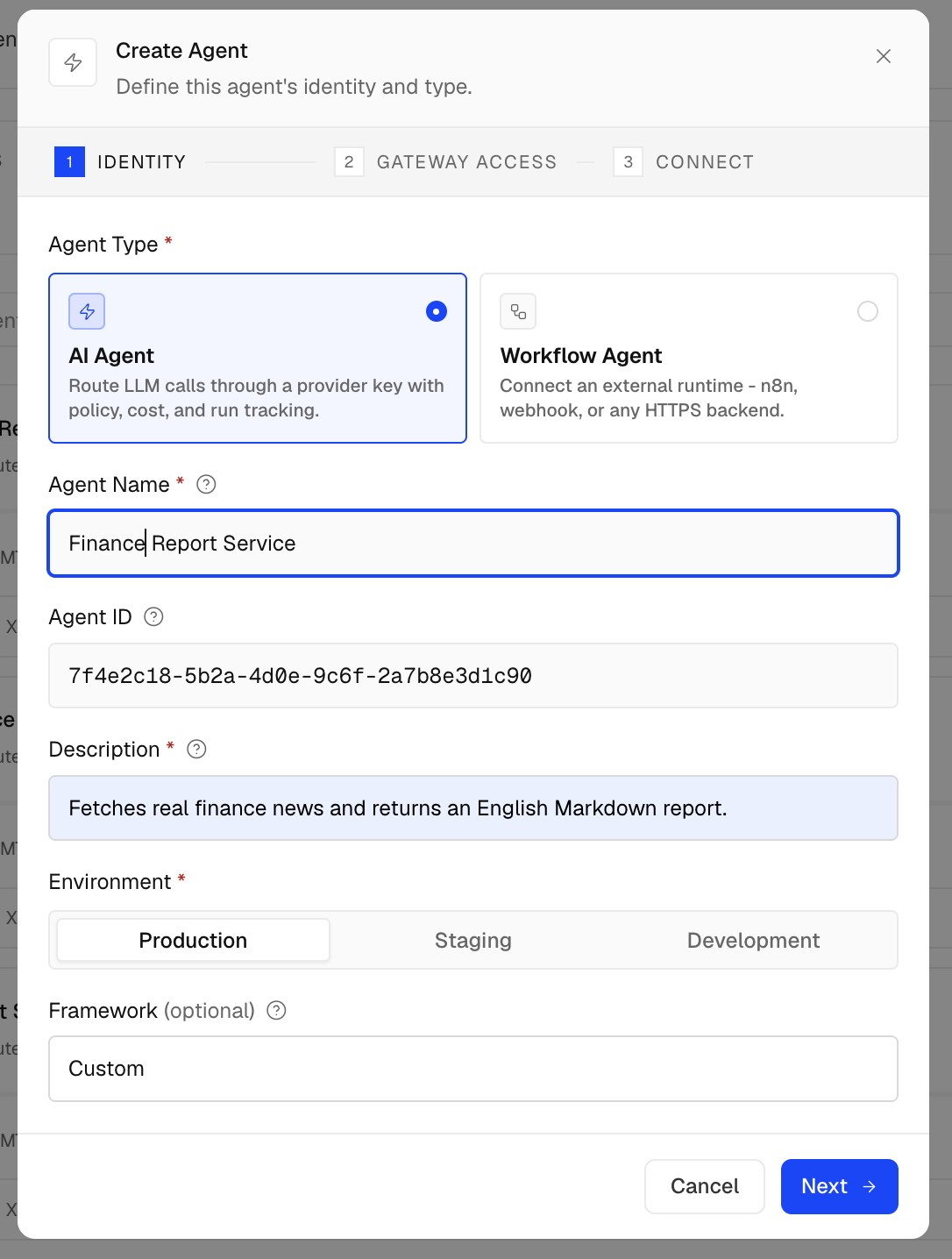
Example AI Agent configuration:
The Agent name should describe the identity that creates traffic. If one service has staging and production deployments, create separate Agents or Virtual Keys so logs and budget controls stay clear.
Next, configure Gateway Access. Choose the provider key and default model the Agent should use, then set budget and policy controls.
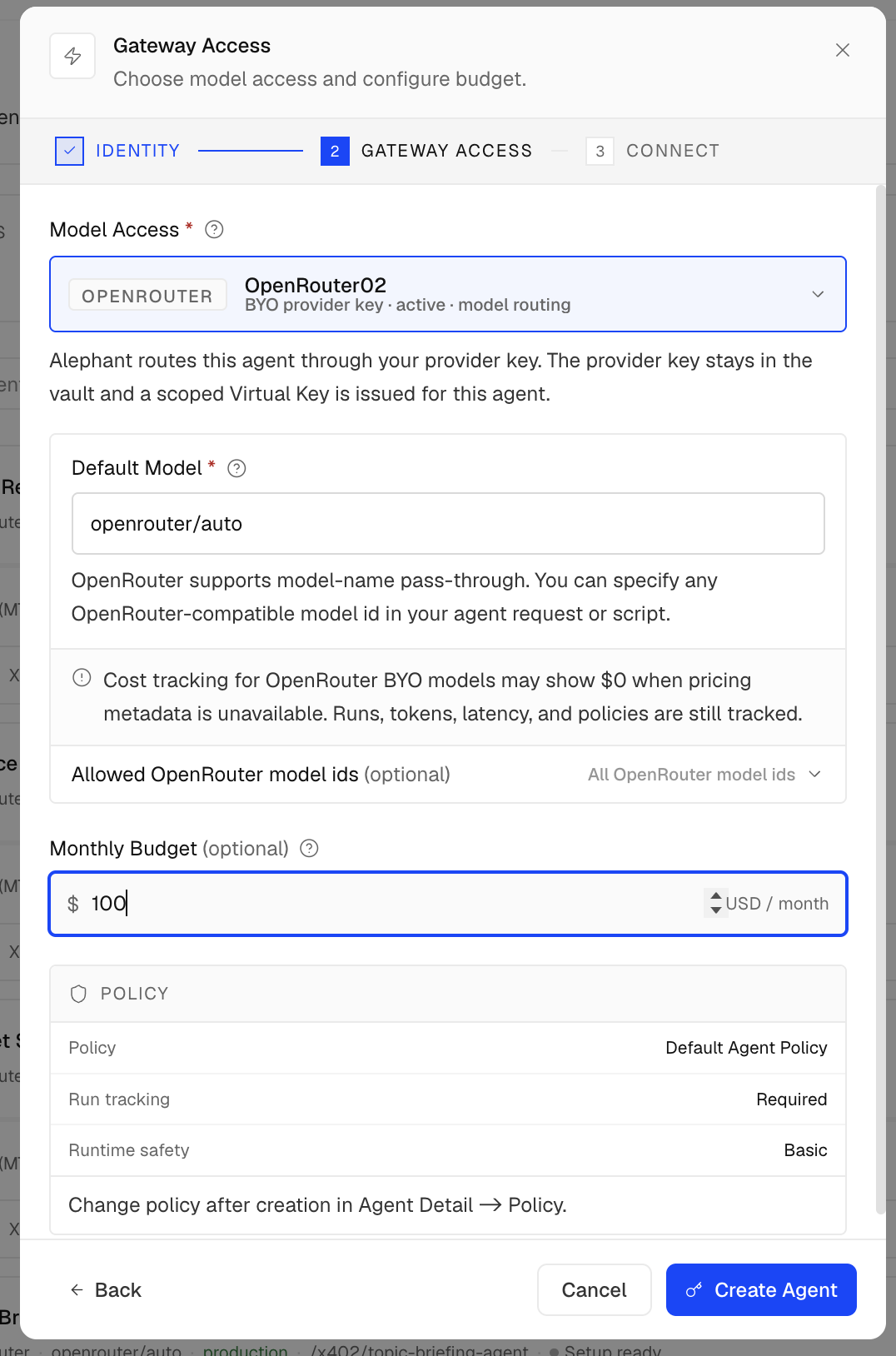
Gateway Access fields shown in the UI:
3. Save The AI Agent Virtual Key
After the AI Agent is created, Alephant returns a Virtual Key for the Agent.
The Virtual Key is the credential your application sends to Alephant Gateway:
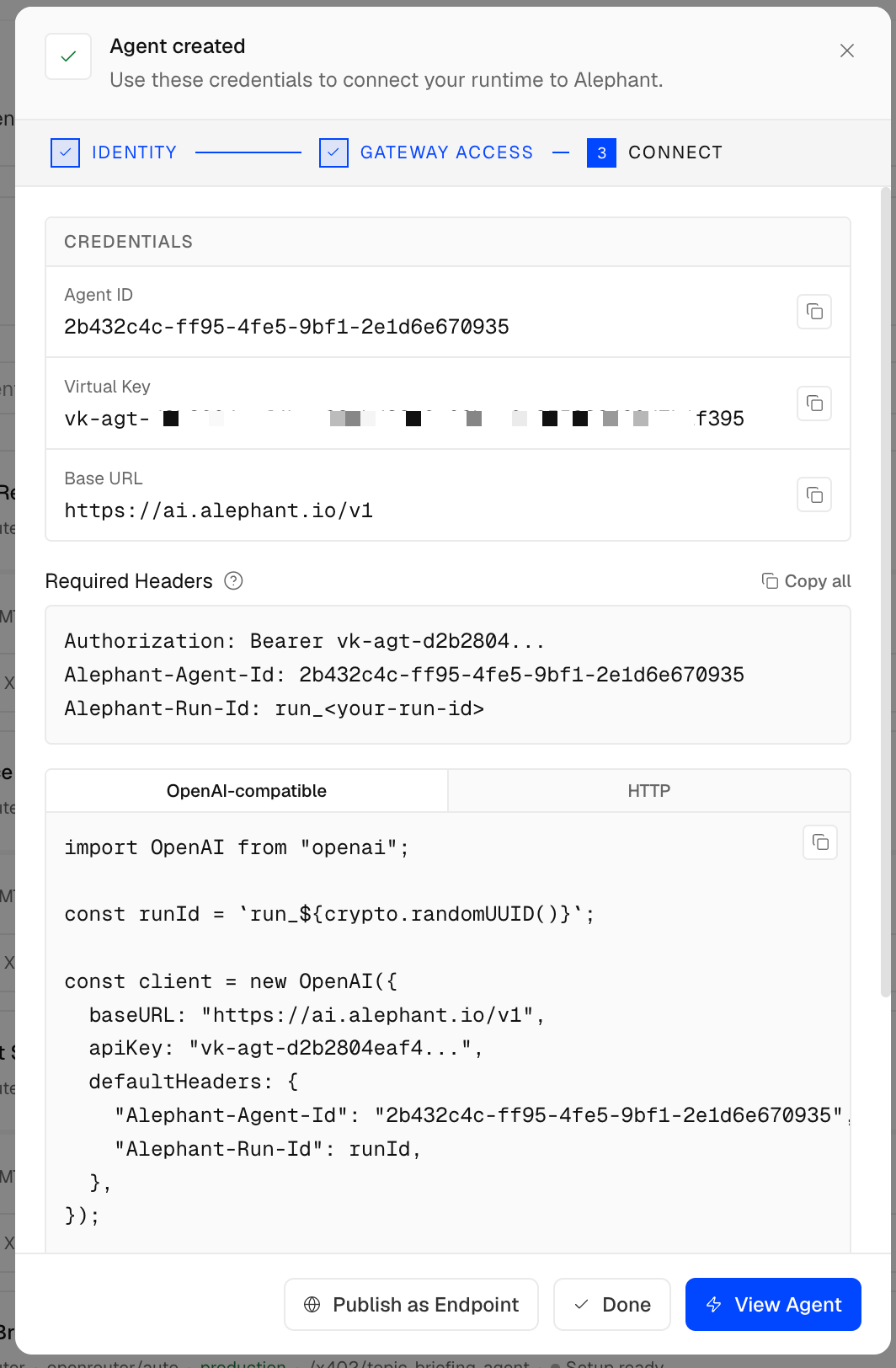
Store the Virtual Key in a secret manager or protected environment variable. Do not commit it to a repository, paste it into screenshots, or expose it to users.
Key relationship:
The application should send only the Virtual Key to Alephant Gateway. It should not send the raw provider key.
4. Send AI Agent Traffic Through Alephant Gateway
Use the Alephant Gateway base URL and pass the Virtual Key in the Authorization header.
Example curl call:
TypeScript example:
5. Create A Workflow Agent
Create a Workflow Agent when Alephant should represent and invoke an external workflow or service runtime.
Examples include:
- An n8n workflow with a production Webhook URL.
- A workflow service with a stable HTTP tool endpoint.
- A data enrichment workflow exposed as an API.
- A compliance, scoring, or research workflow that returns JSON.
The Workflow Agent creation flow has four steps:
In Identity, choose Workflow Agent, then select the runtime family. The current UI shows n8n Workflow and Custom Webhook as runtime options.
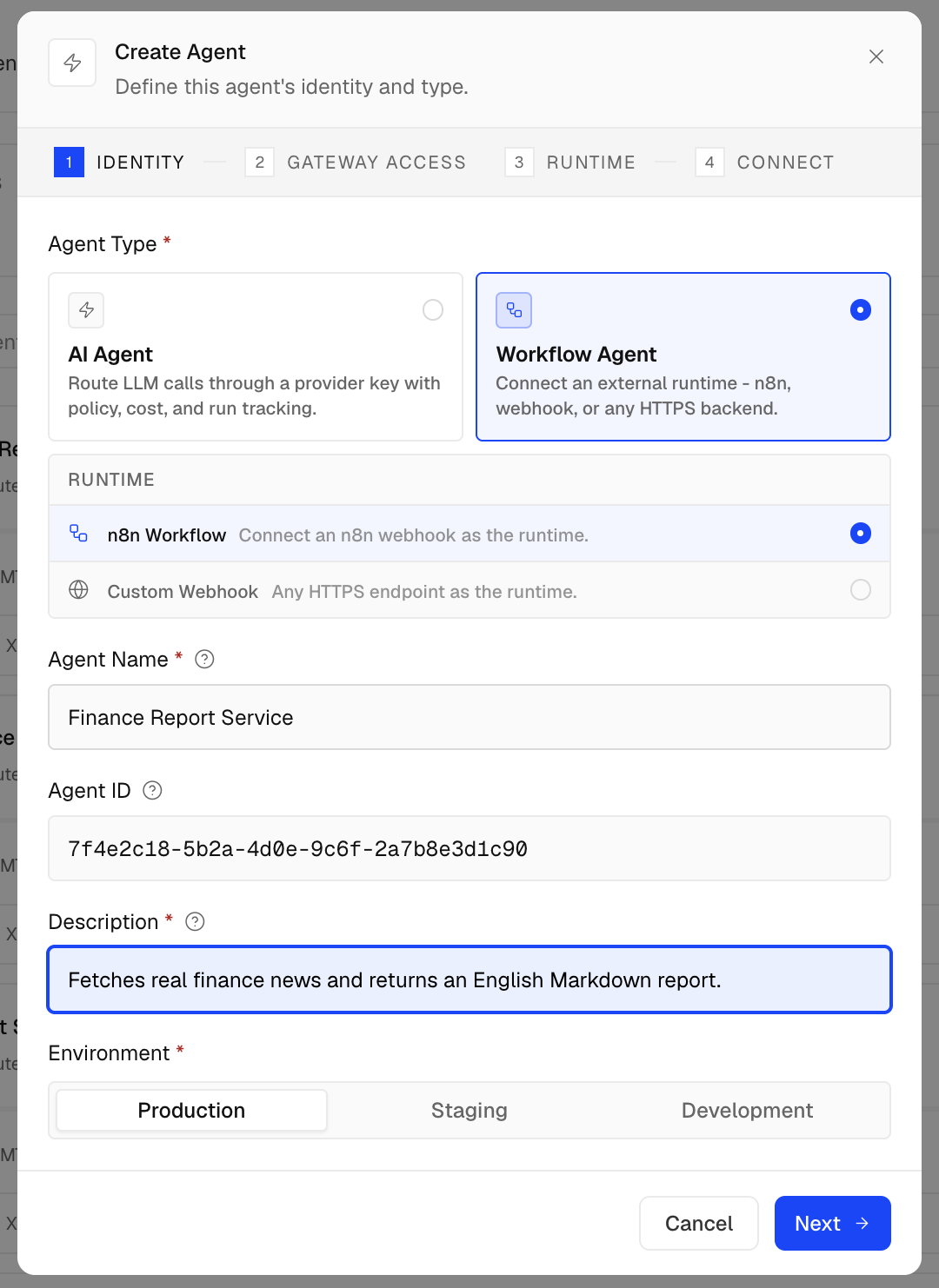
A Workflow Agent still receives Gateway Access settings. This lets Alephant route model access through a provider key, issue scoped credentials, require run tracking, apply policy, and record cost even when the main execution happens in an external workflow runtime.
Example Workflow Agent configuration:
The Workflow Agent name and description should describe the capability buyers or internal users receive. Avoid naming it after internal scripts or implementation details.
In Gateway Access, choose the provider key and default model that Alephant should use for this Agent. Configure the monthly budget and review the attached policy before continuing.
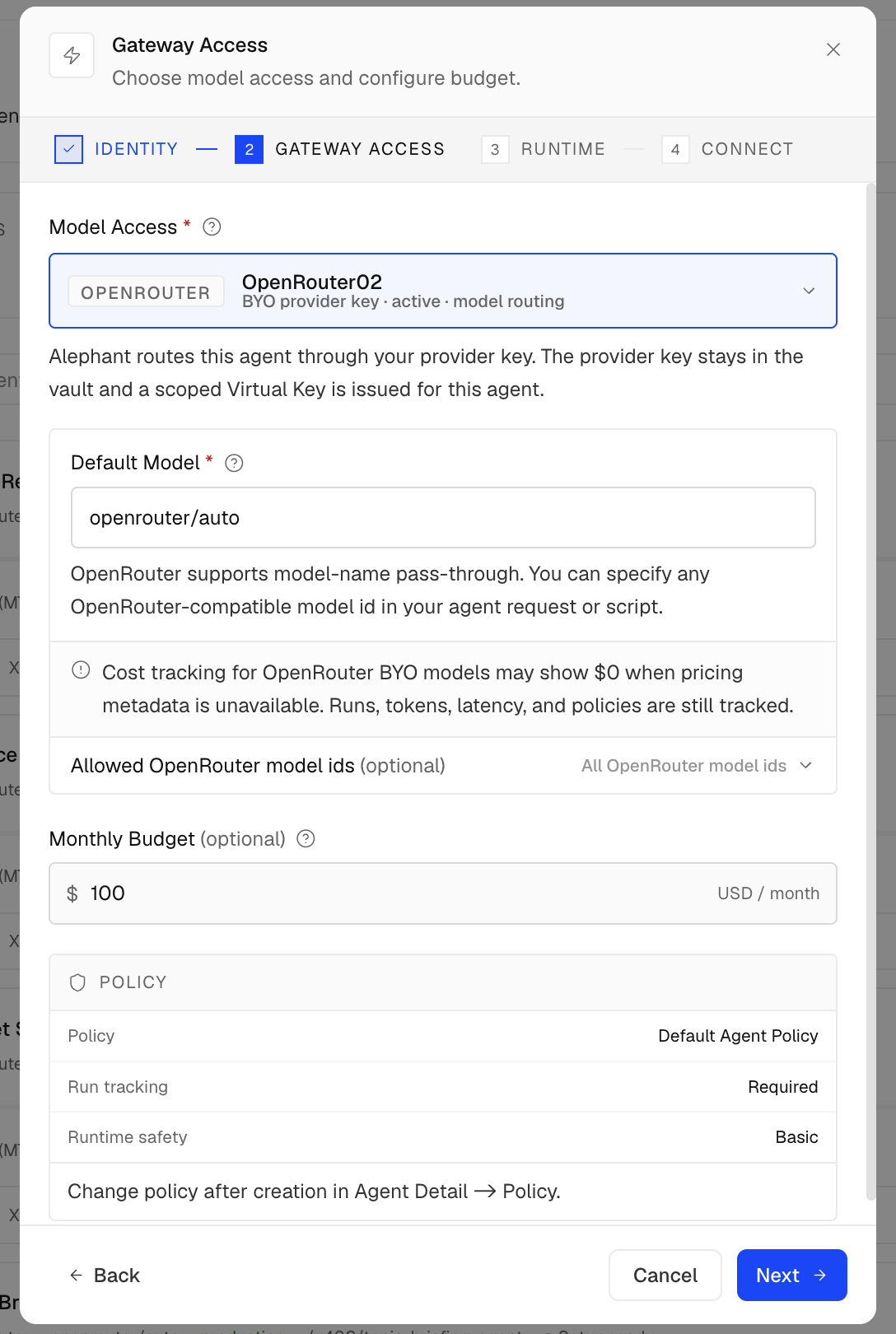
Gateway Access fields shown in the UI:
In Runtime, configure the external workflow connection and test it before finishing.
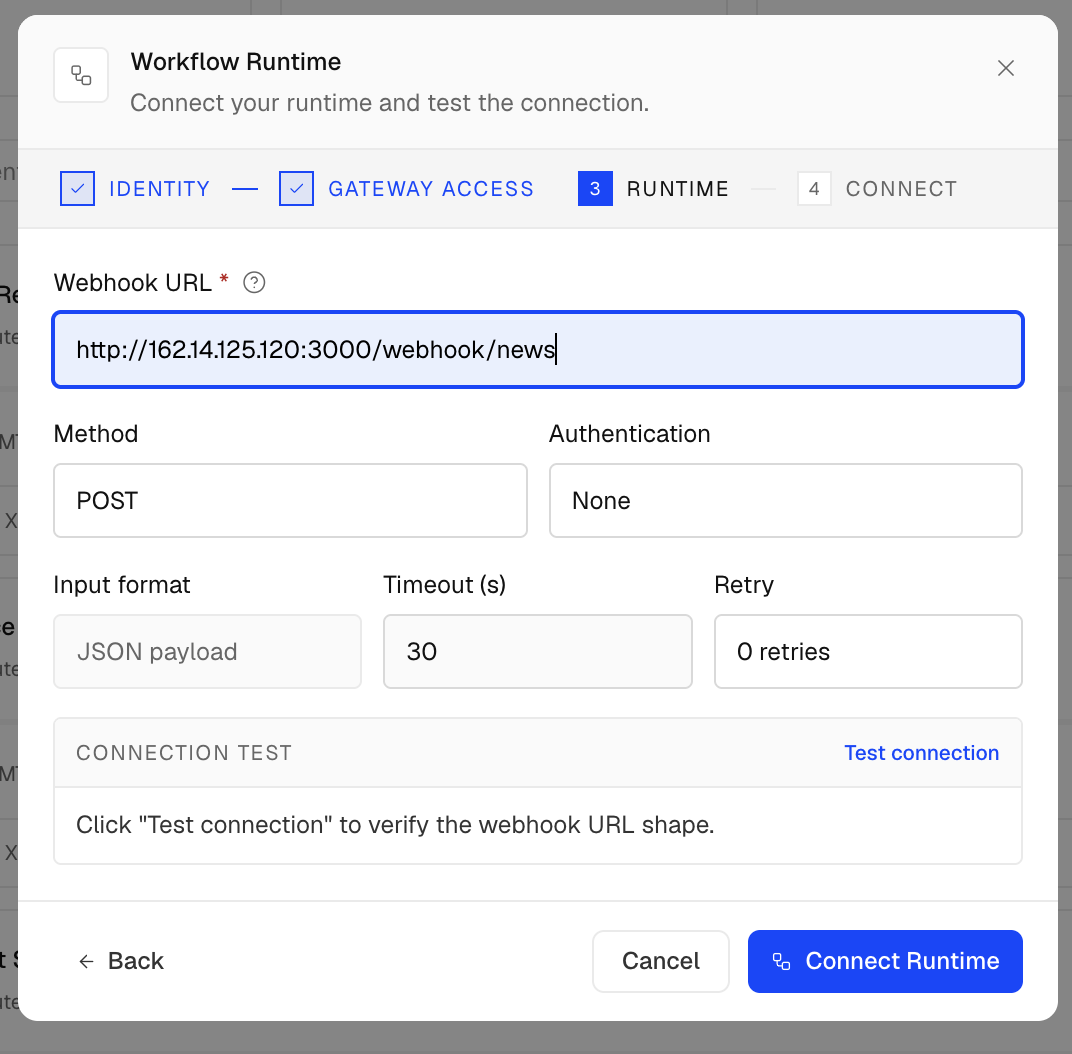
Workflow Runtime fields shown in the UI:
6. Protect Direct Workflow Access
If the Workflow Agent calls an external runtime URL, protect that URL from direct bypass.
Recommended controls:
If the runtime URL is publicly reachable, verify gateway origin before executing the workflow.
A common signature-header pattern is:
Store signing secrets in a secret manager or protected environment variable. Do not commit them to the repository.
7. Attach Agent, Run, Session, Request, And Trace Context
Alephant observability is strongest when traffic includes stable identifiers.
Recommended headers for gateway model traffic:
For paid endpoint activity, use trace_id together with Agent and Run context. Do not replace the Run ID with a payment trace ID:
Alephant-Run-Iddescribes the Agent or workflow task.trace_idlinks payment, settlement, execution, cost, and revenue records.x-request-ididentifies an individual HTTP request.
8. Test And Verify
Test the correct path for the Agent type.
Test Gateway Access
Send a model request through Alephant Gateway with the Agent Virtual Key:
Then check Alephant for:
- Request log.
- Agent attribution.
- Provider and model selected.
- Token usage and cost.
- Budget and rate-limit behavior.
- Policy decisions.
Test Workflow Runtime
For a Workflow Agent, first test the runtime directly from a trusted environment:
Then test the Workflow Agent or paid endpoint path that invokes that runtime. The request should produce one stable JSON response that can be traced back to the Agent, Run ID, and request log.
Production Checklist
Before going live, confirm that:
- The correct Agent type was selected: AI Agent or Workflow Agent.
- The Agent name and description describe the user-facing capability.
- Environment is set correctly, such as development, staging, or production.
- Budgets, rate limits, and policy behavior are configured.
- Gateway traffic includes Agent, Run, Session, and Request identifiers where applicable.
- Workflow runtime URLs are protected by a secret header, gateway signature, IP allowlist, private network, or equivalent control.
- Workflow runtimes validate request JSON before expensive branches run.
- Logs do not contain secrets, raw provider keys, tracebacks, local paths, or raw stderr.