

Tracing
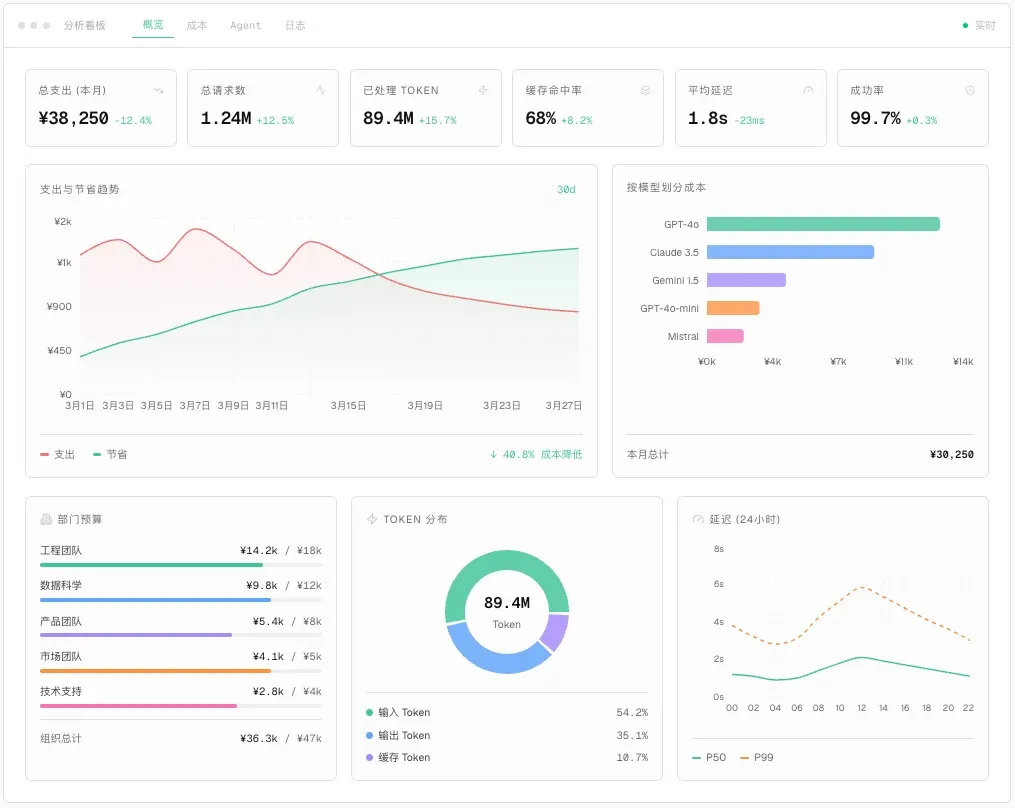
Tracing reconstructs the key steps of a request from entry point through model calls, knowledge retrieval, tool calls, and response delivery. It helps administrators diagnose issues without exposing complete sensitive content to unrelated users.
In supported deployments, the AIvis admin route is /admin/tracing. The page shows the tracing capability entry, product screenshots, and a Contact Sales action. Provider wiring is implemented for Braintrust and Langfuse; some deployments expose the provider setup flow to administrators, while hosted deployments may require an operator or Alephant contact to enable it.
What You Can Inspect
Management Boundary
Before Configuration
- Confirm who can open the AIvis admin tracing page and who can manage tracing-provider credentials.
- Decide whether prompts, responses, tool arguments, or retrieved snippets require redaction, sampling, or shorter retention before they leave the private deployment.
- Prepare at least one model call path for testing, such as a chat request, Agent run, bot message, voice call, image generation, or video generation.
- If you need external traces, prepare a Braintrust or Langfuse project and decide whether the credential is managed by environment variables or the admin provider setup flow.
- Correlate tracing with usage analytics, query history, request logs, budgets, and alerts.
Open the Tracing Entry
Open the AIvis admin console and go to the tracing page. In supported deployments this corresponds to /admin/tracing.
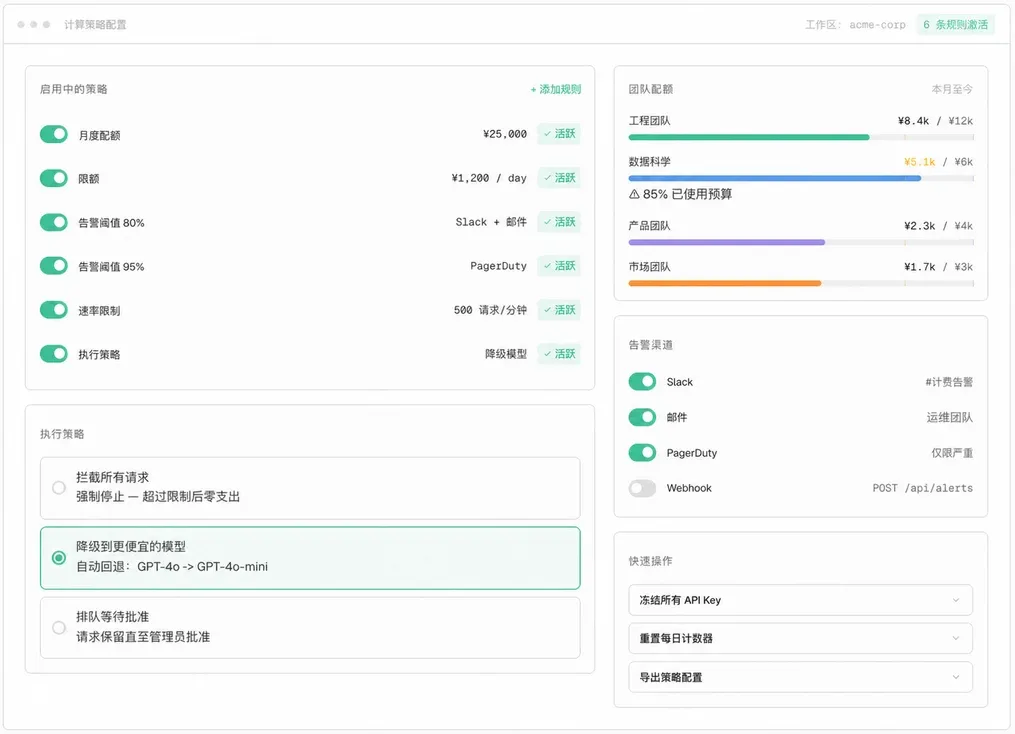
The current page is a capability entry. It explains the observability surface and shows three expected views: usage analytics, budget and policy controls, and request logs. If your deployment only shows Contact Sales, the self-service provider setup is not enabled for that environment. Ask the deployment owner or Alephant contact to enable tracing, or configure the provider through backend environment variables.
Configure a Tracing Provider
AIvis supports two tracing providers:
When provider setup is exposed in the admin page, select the provider, fill the fields, and use the built-in test before saving. The backend validates the credential first, then saves the provider as enabled.
For operator-managed deployments, configure the same values through environment variables:
In multi-tenant hosted deployments, AIvis resolves tracing providers from environment variables only. In single-tenant deployments, an enabled database provider row can override the environment fallback for the same provider.
Generate a Test Trace
- Save or enable the provider configuration.
- Send one controlled AIvis request through a known path, such as a chat with a test Agent.
- Record the timestamp, user, workspace, Agent, model, and expected result.
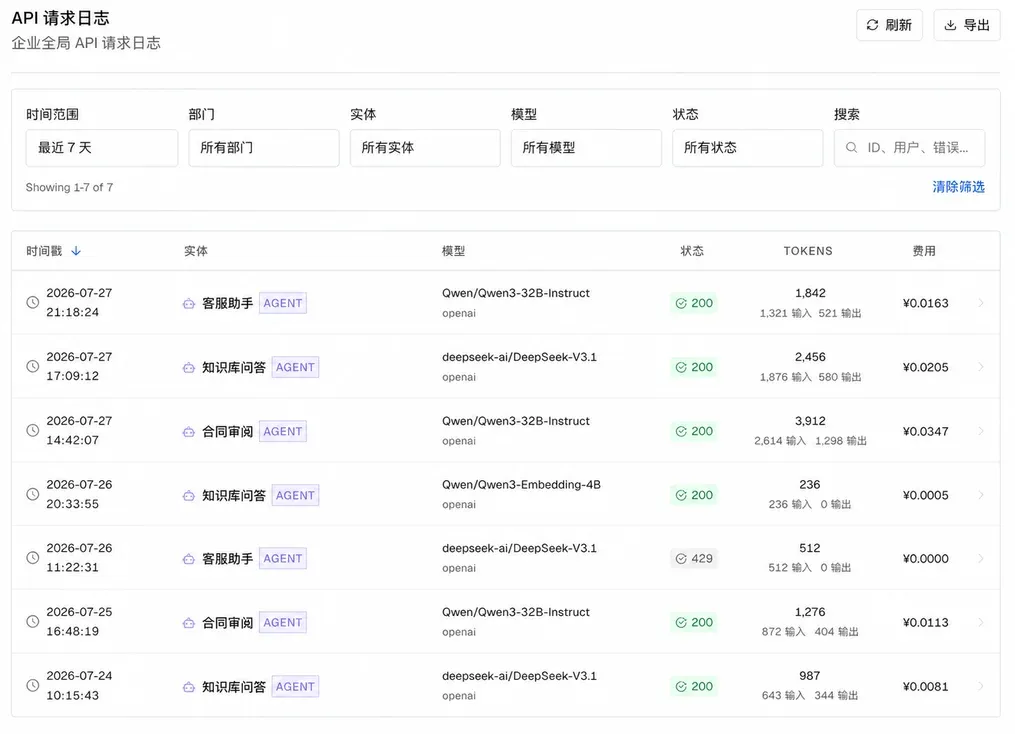
- Open the request logs or external tracing provider and filter by the same time range and model.
- Confirm that the record includes status, latency, token usage, cost metadata, and the correct flow name.
AIvis traces many LLM paths through explicit flow names, including chat responses, chat summarization, query expansion, document filtering, embeddings, reranking, image generation, video generation, speech-to-text, text-to-speech, privacy gateway calls, and Agent automation calls. A missing trace usually means the provider is not active, the request path is not instrumented, or the request failed before the model call started.
Verification
- The AIvis tracing page can be opened only by authorized operators, admins, or auditors.
- A test request appears in request logs with the expected time range, model, status, token count, cost, and latency.
- If Braintrust or Langfuse is enabled, the same request can be found in the external project.
- Failed or denied requests include a usable reason without exposing unrelated sensitive content.
- Budget, alert, rate-limit, or fallback changes are visible in later request behavior.
Troubleshooting
Security and Maintenance
- Store provider API keys only in protected configuration or the admin credential store.
- Do not put API keys, raw prompts, private responses, access tokens, or tool secrets into documentation, tickets, screenshots, or Agent instructions.
- Rotate Braintrust and Langfuse credentials when administrators change or a key may have leaked.
- Review tracing access regularly because traces can reveal model names, user IDs, workspace IDs, document references, errors, and cost patterns.
- Keep raw-content retention shorter than audit metadata retention when privacy requirements are strict.
Related Pages
- Model Credentials explains where model-provider credentials are configured.
- Language Models explains how model routing affects traced calls.
- Generation and Chat explains the user-facing chat path that can be used for test traces.
- Hooks explains controlled outbound callbacks that can be correlated with traces.